★★★★★

"Arrived earlier than quoted, Thank you Just Camp for the great service"

Ross

★★★★★

"Website was easy to navigate and I received my purchase promptly"

Brenda

★★★★★

"Purchased for a great price, service was excellent, postage very quick"

Lindy

★★★★★

"Great product and service A++"

Anthony

★★★★★

"My order arrived faster than expected and the quality was just as good as the big name brands"

Aaron

Choosing Pioneer Dash Cams, Dual Cameras & Hardwire Accessories

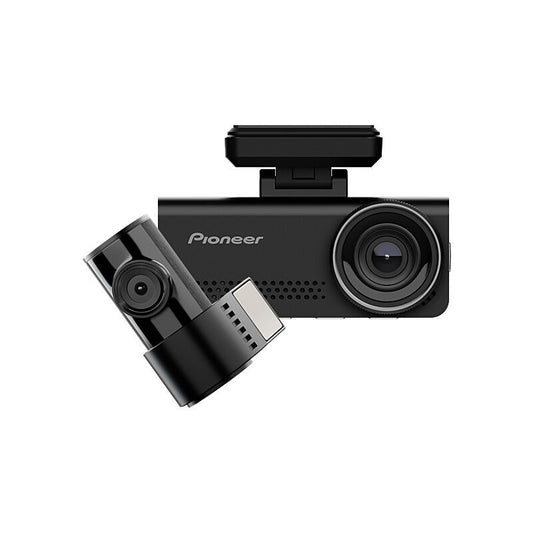
Pioneer dash cams range from compact front-facing cameras to dual-channel systems with higher-resolution front recording, rear-camera coverage and selected driver-assistance or connectivity features. The best fit depends on the coverage you want, the detail you want to capture, how you prefer to review footage and whether you plan to use supported parking-mode features.

Start With Front-Only or Front-and-Rear Coverage

A single-camera dash cam records the road ahead and keeps the installation relatively simple. A dual-camera system adds a rear camera for broader coverage around the vehicle. The current Pioneer range includes both formats, so decide first whether front-only recording is enough for your driving or whether you want simultaneous front-and-rear coverage.

For dual-camera models, check the resolution of both cameras rather than assuming the rear camera records at the same resolution as the front.

Compare Full HD, 1.5K, 2K and 4K Recording

The current Pioneer range includes front-camera recording options from Full HD and 1.5K through to 2K and 4K on selected models. Higher resolution can retain more image detail when conditions are favourable, but resolution is only one part of footage quality.

Sensor design, exposure processing, lighting, windscreen condition, camera placement and vehicle movement can all affect what is visible in a recording. Choose resolution alongside the wider feature set rather than from the headline number alone.

Look Beyond Resolution for Image Quality

Selected Pioneer models list features such as HDR or WDR, Sony STARVIS sensors or night-recording technology. These features are model-specific and should not be assumed across the range. Check the exact product listing when low-light recording or difficult contrast is important to you.

GPS, G-Sensor and ADAS Features Vary by Model

GPS, G-sensor event detection and driver-assistance features appear on selected Pioneer dash cams. A G-sensor can be used by supported models to identify events and protect relevant recordings, while GPS can add location or journey data. ADAS functions also vary by model and should be treated as assistance features rather than a substitute for attentive driving.

Review the individual product specifications for the exact functions provided by the camera you are considering.

Choose Between an On-Camera Screen and App-Based Review

Some Pioneer models include an on-camera display for changing settings or reviewing footage, while selected cameras also support a Pioneer smartphone app. App compatibility and available functions vary by model, and different Pioneer camera families can use different apps.

If phone access matters to you, confirm the exact app named on the product page and check device compatibility before purchase.

Memory Cards and Recording Storage

Selected current Pioneer dash cams include a microSD card, with the supplied capacity varying by model. Supported maximum card capacity can also differ. Do not assume the same card size or compatibility across every camera.

Loop recording allows supported dash cams to continue recording by cycling through older routine footage when storage fills. Event or protected recordings can be handled differently, so periodically review and manage the card in line with the camera instructions.

Parking Mode and the RD-HWK300 Hardwire Kit

The current Pioneer camera listings state that parking mode on those supported models requires the optional RD-HWK300 hardwire kit. The hardwire kit provides a direct vehicle-power connection for compatible Pioneer drive recorders and is also available in a bundle with selected cameras.

Compatibility matters: confirm that the exact dash cam supports the RD-HWK300 and follow the installation instructions for both the camera and vehicle.

Hardwiring and Vehicle Electrical Systems

A hardwired installation can provide a cleaner permanent setup and enable supported parking-mode functions, but it connects into the vehicle electrical system. Use the specified Pioneer accessory, follow the vehicle and dash-cam instructions, and avoid interfering with airbags, safety systems or unrelated wiring. If you are not confident with vehicle electrical work, use an appropriately qualified installer.

Plan Camera Placement Before Installation

Mount the camera where it has a useful view of the road without unnecessarily obstructing the driver's view. Position cables securely and keep them clear of controls and safety equipment. Rear-camera placement on dual systems also needs a clear view and a practical cable route.

Always follow the mounting and legal requirements that apply where the vehicle is used.

Understand Loop, Event and Manual Recording

Supported Pioneer models can offer loop recording, event recording triggered by the G-sensor and manual recording. These modes serve different purposes: loop recording manages routine footage, while event or manual clips can preserve recordings you may want to review later.

Exact recording durations, file handling and settings vary by model, so use the individual manual as the source of truth.

Dash Cams for Road Trips and 4WD Touring

Pioneer dash cams can be used for everyday driving as well as longer touring trips. For extended travel, consider whether you want rear coverage, GPS, a screen, smartphone access and a larger supported memory-card capacity, as well as how the camera and cabling will be mounted in your vehicle.

A dash cam is still vehicle electronics: protect the camera, rear unit, cables and connectors from conditions outside the manufacturer's instructions, and inspect the installation after rough-road travel.

Common Pioneer Dash Cam Mistakes to Avoid

  • Choosing by resolution alone without comparing front-only versus dual-camera coverage.
  • Assuming the rear camera records at the same resolution as the front camera.
  • Assuming every Pioneer model includes GPS, ADAS, Wi-Fi, the same smartphone app or the same screen.
  • Assuming every camera includes the same microSD card capacity or supports the same maximum card size.
  • Expecting parking mode to work without the compatible hardwire setup where the product requires one.
  • Buying a hardwire kit without checking compatibility with the exact Pioneer dash cam.
  • Routing cables where they could interfere with airbags, controls or driver visibility.
  • Treating ADAS alerts as a replacement for attentive driving.
  • Leaving important footage only on the memory card without reviewing or saving it when needed.

Compare Pioneer With the Wider Dash Cam Range

To compare Pioneer models with other vehicle cameras, browse Dash Cams. For broader touring and vehicle accessories, explore 4WD Gear.

Product note: Recording resolution, camera channels, image sensors, HDR/WDR, GPS, ADAS, Wi-Fi, smartphone apps, displays, memory-card inclusions and limits, parking-mode support, hardwire compatibility and included accessories vary by model. Check the individual product specifications before ordering.

Safety note: Follow the dash-cam, hardwire-kit and vehicle manufacturers' instructions. Mount equipment without compromising driver visibility or vehicle safety systems, use only compatible electrical connections, and use an appropriately qualified installer if you are not confident with hardwiring.

Guide reviewed: August 2026.

Frequently Asked Questions

Which Pioneer dash cam is best for everyday driving?

For simple front-only recording, Pioneer offers compact options such as the VREC-H120SC and the screened VREC-H320SC. If you also want rear coverage, choose a dual-camera model. Compare recording resolution, screen or app access, GPS and the other features that matter to you.

What is the difference between single and dual Pioneer dash cams?

A single-camera Pioneer dash cam records the road ahead, while a dual-camera system adds a rear camera for broader coverage. Front and rear recording resolutions can differ on dual models, so check both camera specifications rather than assuming they record at the same resolution.

Do Pioneer dash cams require a hardwire kit?

No, not for normal driving recording when the camera uses its standard supported power connection. For compatible Pioneer models, parking mode requires the optional RD-HWK300 hardwire kit. Check compatibility with your exact dash cam before ordering or installing the kit.

Which Pioneer dash cam should I choose?

Compare whether you want front-only or front-and-rear coverage first, then consider recording resolution, screen size, GPS, G-sensor, HDR or WDR, ADAS, smartphone access, memory-card support and parking-mode requirements. Features vary by Pioneer model, so use the individual specifications to choose the combination that suits your vehicle and driving.

Are Pioneer dash cams suitable for 4WD touring and road trips?

Pioneer dash cams can be used for everyday driving, road trips and 4WD touring. For longer trips, consider whether you want rear-camera coverage, GPS, smartphone access and a larger supported memory-card capacity. Mount the camera and route cables securely, follow the product instructions and inspect the installation after rough-road travel.

What recording resolution should I choose for a Pioneer dash cam?

Pioneer dash cams are available with Full HD, 1.5K, 2K and 4K front-camera recording. Higher resolution can retain more detail, but image quality also depends on the sensor, HDR or WDR processing, lighting, windscreen condition and camera placement.

Do Pioneer dual dash cams record the front and rear at the same time?

Yes, compatible Pioneer dual-camera models record front and rear coverage together. The two cameras can use different resolutions, so check both the front and rear specifications when comparing models.

Do Pioneer dash cams include a microSD card?

Some Pioneer dash cams include a microSD card, with capacities such as 64GB or 128GB depending on the model. Included card size and maximum supported storage vary, so check the product inclusions for the camera you are considering.

Can I view Pioneer dash cam footage on my phone?

Yes, on compatible models. Pioneer smartphone apps can provide functions such as settings, live view and footage review. App compatibility and available features vary by dash cam, so check the app requirements for your model.

What should I check before hardwiring a Pioneer dash cam?

Confirm that the exact Pioneer dash cam supports the RD-HWK300 or other specified hardwire accessory, then follow both the camera and vehicle installation instructions. Cable routing and electrical connections should not interfere with airbags, controls or safety systems. If you are not confident with vehicle electrical work, use an appropriately qualified installer.

Popular at Just Camp

1 of 6